Mastering the Golden Patina Photo Effect for High-Fashion Visuals
In the evolving landscape of digital photography and graphic design, the pursuit of unique aesthetic signatures has never been more critical. Among the myriad of stylistic choices available to modern creators, the Golden Patina Photo Effect stands out as a sophisticated method for imbuing images with depth, history, and luxury. This artistic approach transcends simple filtering; it is a comprehensive textural transformation that mimics the natural aging process of metals, blending the warmth of gold with the rugged authenticity of wear and tear. For professionals seeking to elevate their portfolios or hobbyists looking to add a distinct flair to personal projects, understanding how to effectively apply this effect is essential.
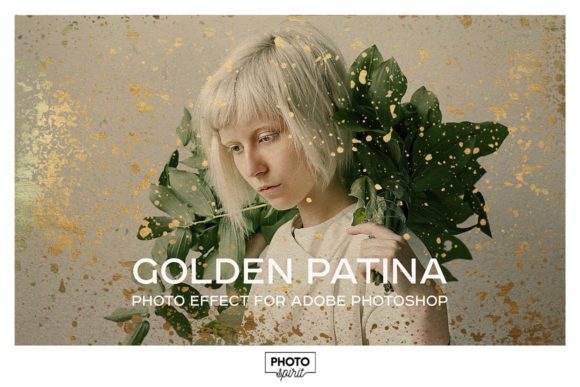
The core appeal of this style lies in its ability to bridge the gap between contemporary high-fashion photography and vintage artistry. By integrating elements such as gold textures, patina, scratches, and splashes, photographers can create narratives that feel both timeless and immediate. The process involves more than just overlaying a color grade; it requires a nuanced manipulation of layers, masks, and textures to achieve a result that looks organic rather than digitally imposed. This is where specialized tools, such as a well-structured PSD template, become invaluable assets in the creative workflow.
The Anatomy of Artistic Aging and Texture
To truly leverage the power of the Golden Patina Photo Effect, one must first understand the components that constitute this visual language. Patina, traditionally referring to the green or brown film on the surface of old bronze or similar metals, is reinterpreted here through a golden lens. This shift changes the emotional tone of the image from one of decay to one of preserved value and elegance. The effect relies heavily on the interplay between light and texture. Gold textures provide the luminous highlights that catch the viewer’s eye, while the underlying patina offers the mid-tones and shadows that give the image weight.
However, a flat application of gold would appear artificial. The realism comes from the imperfections. This is why elements like scratches, grunge, and splashes are integral to the design. These mask textures break up the uniformity of the digital image, introducing chaos and character. When combined with paper textures, the photograph gains a tactile quality, suggesting that the image itself is a physical artifact that has survived the passage of time. This layering technique is what separates amateur edits from professional-grade artistic effects. It allows for a complex visual hierarchy where the subject remains the focal point, yet is enveloped in an atmosphere of aged grandeur.
Streamlining the Creative Workflow with PSD Templates
Creating such complex compositions from scratch can be time-consuming and technically demanding. It requires a deep understanding of blending modes, opacity adjustments, and mask refinement. This is where a dedicated PSD template serves as a powerful accelerator for creativity. A high-quality template, such as one sized at 5000x3000 pixels, provides a robust canvas that supports high-resolution output suitable for large-format prints or detailed digital displays. The primary advantage of using a pre-built template is the organization of assets. Instead of searching for individual brushes and textures across various libraries, everything is contained within a single, logical structure.
The workflow becomes intuitive: place your photo, select your desired options, and adjust. This non-destructive editing process ensures that the original image remains untouched, allowing for endless experimentation. Users can toggle between different gold textures to see which complements the lighting of their specific photograph. They can adjust the intensity of the patina to suit the mood, whether it be subtle and understated or bold and dramatic. The inclusion of a user guide and demo video further reduces the learning curve, making advanced techniques accessible to users of all skill levels. This efficiency allows creators to focus on the artistic vision rather than the technical execution.
Versatility Through Customization and Control
One of the most significant strengths of a comprehensive Golden Patina Photo Effect toolkit is its versatility. While the default settings may offer a stunning starting point, the true potential is unlocked through customization. The ability to create your own textures using a set of included brushes empowers artists to develop a unique signature style. Brushes for crackle, spot, and spray allow for precise control over where and how the aging effects appear. For instance, a photographer might want to concentrate the gold splashes around the subject’s eyes to draw attention, or use the crackle brush to add texture to the background without obscuring the main figure.
Furthermore, the integration of vintage black and white processing options adds another layer of depth. Not every image benefits from full-color saturation. Sometimes, stripping away color to focus on contrast and matte finishes can enhance the emotional impact of the patina. The template’s inclusion of a vintage black and white layer group, complete with matte and contrast adjustments, allows for seamless transitions between color and monochrome aesthetics. This flexibility ensures that the tool is not limited to a single genre but can be adapted for fashion editorials, portrait photography, product showcases, and even architectural visuals.
- High-Resolution Foundation: The 5000x3000 px PSD template ensures that details remain crisp, supporting professional printing standards.
- Diverse Texture Library: With 2 patina textures, 3 gold textures, and 3 paper textures, users have a wide palette to mix and match.
- Advanced Masking Options: 11 mask textures including scratches, splashes, and grunge provide the necessary imperfections for realism.
- Custom Brush Set: Includes crackle, spot, and spray brushes for manual texture creation and fine-tuning.
- Comprehensive Learning Resources: A user guide and demo video facilitate quick mastery of the template’s features.
Applications in Modern Digital Media
The relevance of the Golden Patina Photo Effect extends beyond static photography. In an era where content must stand out in crowded social media feeds, these textured visuals offer a stopping power that clean, minimalist images often lack. Fashion brands utilize this aesthetic to convey heritage and luxury, associating their products with timeless quality. Wedding photographers employ these effects to create heirloom-quality albums that feel nostalgic and romantic. Even in commercial advertising, the addition of gold patina can elevate a standard product shot into a piece of art, suggesting premium value and exclusivity.
Educators and researchers in visual arts also find value in studying these effects. Understanding how digital tools mimic physical processes like oxidation and wear provides insight into the psychology of perception. Why do we find aged objects beautiful? How does texture influence our emotional response to an image? By experimenting with the variables in a PSD template—adjusting the balance between gold brightness and patina darkness—students can learn fundamental principles of composition and color theory in a practical, hands-on manner.
Achieving Professional Results with Minimal Effort
For business owners and marketers, the efficiency of using a preset effect cannot be overstated. Time is a valuable resource, and the ability to produce high-quality, consistent visuals quickly is a competitive advantage. The structured nature of the template ensures that brand consistency is maintained across multiple images. By saving specific combinations of textures and adjustments as presets, teams can replicate the look across entire campaigns without needing to reinvent the wheel for each photo. This scalability makes the Golden Patina Photo Effect a viable solution for agencies handling high-volume content production.
Moreover, the non-destructive nature of the PSD format means that revisions are easy. If a client requests a less intense gold effect or a different paper texture, these changes can be made in seconds by adjusting layer visibility or opacity. This agility is crucial in fast-paced professional environments where feedback loops are tight. The inclusion of specific elements like the matte and contrast adjustments within the black and white group allows for fine-tuning the final output to match specific print requirements or digital display standards.
Ultimately, the goal of using such tools is to enhance the storytelling capability of the photograph. The gold patina is not just a decorative overlay; it is a narrative device. It suggests history, value, and endurance. By providing a suite of tools that includes everything from broad textures to fine detail brushes, the template empowers creators to tell these stories with precision and ease. Whether you are a seasoned professional looking to expand your stylistic range or a hobbyist eager to explore new artistic territories, the integration of these elements offers a pathway to creating compelling, high-fashioned visuals that resonate with audiences on a deeper level.
The convergence of traditional artistic concepts with modern digital convenience represents the future of photo editing. As technology continues to advance, the demand for authentic, textured, and emotionally resonant imagery will only grow. Tools that facilitate this blend of old-world charm and new-world efficiency will remain indispensable. By mastering the Golden Patina Photo Effect, creators position themselves at the forefront of this trend, capable of producing work that is not only visually striking but also rich in meaning and context.