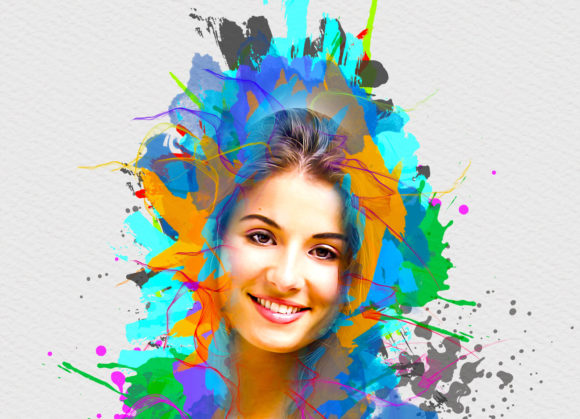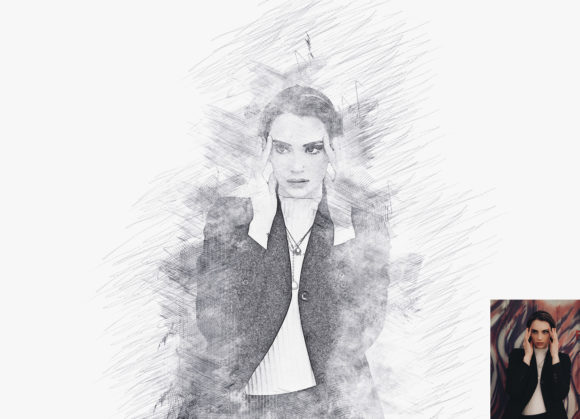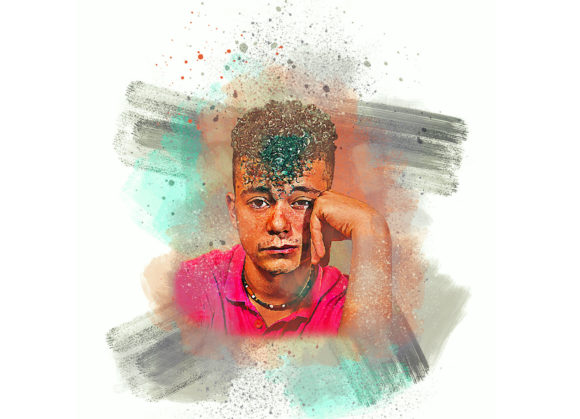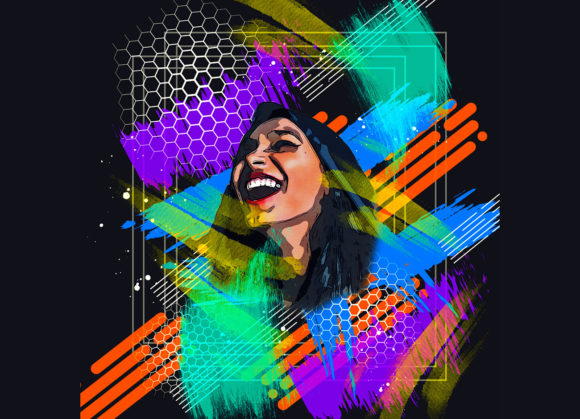
Transforming Digital Photos into Art with a Painting Watercolor Photoshop Action
Digital photography has given us the power to capture moments with crystal clarity, but sometimes that hyper-realism feels cold or impersonal. There is a growing desire among creatives, marketers, and hobbyists alike to soften edges, blend colors, and introduce the organic unpredictability of traditional media into their digital workflows. This is where a specialized Painting Watercolor Photoshop Action becomes an invaluable tool. Rather than spending hours manually painting over photographs layer by layer, this automated yet customizable solution bridges the gap between photography and fine art, offering a professional finish that retains the soul of the original image while infusing it with artistic flair.
Bridging the Gap Between Photography and Fine Art
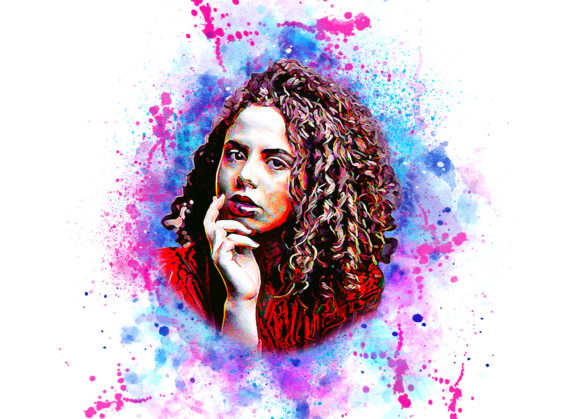
The core appeal of using a Painting Watercolor Photoshop Action lies in its ability to democratize artistic effects. Historically, achieving a convincing watercolor look required significant skill in both photography and traditional painting techniques. You had to understand how pigments bleed, how paper texture affects absorption, and how light interacts with translucent layers. Today, these complex processes are encoded into a series of automated steps within Photoshop. However, not all actions are created equal. A high-quality pack does more than just apply a filter; it constructs a non-destructive environment where you can tweak variables like color intensity, brush texture, and canvas expansion to suit your specific vision.
For instance, when you utilize a robust action pack, you are not just applying a flat overlay. You are engaging with a system that often includes multiple layers for shadows, highlights, and mid-tones, allowing for a depth that mimics real watercolor paper. The inclusion of ten different color options means that the mood of the piece can shift dramatically—from the warm, nostalgic tones of a sunset to the cool, melancholic blues of a rainy day—without altering the underlying structure of the photo.
Real-World Applications Across Industries
The versatility of this tool extends far beyond personal hobby projects. Various industries have found practical uses for converting standard photographs into watercolor-style imagery, leveraging the emotional resonance that hand-painted aesthetics evoke.
- Wedding and Event Photography: Couples often seek unique ways to display their memories. A watercolor effect softens the harshness of flash photography and adds a romantic, dreamlike quality to portraits. It transforms a standard headshot into a piece of wall art that feels timeless rather than trendy.
- Interior Design and Home Decor: Designers frequently need custom artwork that fits specific color palettes. By turning a client’s favorite travel photo or family portrait into a watercolor piece, designers can create bespoke decor that matches room aesthetics perfectly. The ability to customize colors ensures the art complements the furniture and wall paint.
- Marketing and Branding: Brands aiming for an organic, eco-friendly, or artisanal image often use watercolor textures in their campaigns. A product shot converted into a watercolor style can feel less commercial and more approachable, appealing to consumers who value craftsmanship and natural elements.
- Greeting Cards and Stationery: Independent sellers on platforms like Etsy thrive on unique, handcrafted looks. Using a Painting Watercolor Photoshop Action allows these creators to produce high-volume, consistent designs for birthday cards, invitations, and thank-you notes without the time commitment of manual painting.
Technical Considerations for Optimal Results
While the promise of "one-click" art is enticing, achieving professional-grade results requires attention to technical details. The software environment plays a crucial role. This particular action has been rigorously tested and optimized for English versions of Photoshop, ranging from CS5.5 up to CC2020. Users operating outside these versions or using non-English interfaces may encounter compatibility issues, as the action relies on specific layer names and menu commands that vary across languages and updates.
Preparation of the source image is perhaps the most critical step that beginners overlook. For the algorithm to work effectively, the canvas needs breathing room. Watercolor paintings often feature soft, bleeding edges that extend beyond the main subject. If your photo is cropped tightly, the effect may look cramped or artificial. Therefore, it is essential to extract your canvas area before running the action. This involves selecting your background, using the crop tool to extend the sides or all edges, and resizing the image to a substantial dimension, such as 2000x2000 pixels at 72 DPI. This extra space allows the digital "paint" to flow naturally, mimicking the way water spreads on physical paper.
Another key technical requirement is the creation of a specific guide layer. The action typically requires a new layer named "paint" in lowercase. On this layer, users are encouraged to loosely brush over the areas they want to emphasize. This step gives the user control over the focal point. By closing the eye of the paint layer and keeping it selected, the action uses this map to determine where the heaviest pigment should appear. This simple interaction ensures that the final output is not random but directed by your artistic intent.
Customization and Workflow Efficiency
One of the strongest advantages of this tool is its non-destructive nature. In digital art, preserving the original image is paramount. A well-structured action organizes layers logically, allowing you to toggle visibility, adjust opacity, or change blending modes after the effect has been applied. The inclusion of ten different color options provides a sandbox for experimentation. You might start with a naturalistic palette and then switch to a monochromatic scheme to see how it alters the emotional impact of the image.
Furthermore, the ease of installation and use lowers the barrier to entry. With included help files, PDF guides, and pre-loaded brushes, even users with intermediate Photoshop skills can achieve expert-level results. The process is designed to be intuitive: open the photo, prepare the canvas, create the guide layer, and hit play. The result is a high-quality, organized file that is ready for further refinement or immediate export.
Potential Limitations and Best Practices
Despite its strengths, it is important to recognize that no automated action can replace the nuance of a human hand entirely. Complex images with cluttered backgrounds may require additional masking or cleanup before applying the action. The effect works best on subjects with clear shapes and distinct lighting. Portraits, landscapes, and still lifes tend to yield the most compelling results, whereas busy street scenes might become muddy if not properly prepared.
Additionally, while the action supports a wide range of Photoshop versions, users should always back up their original files. Although the effect is non-destructive, experimenting with different settings can lead to unexpected outcomes. Taking the time to understand how the brush tool interacts with the "paint" layer will significantly enhance the final output. It is not just about clicking a button; it is about guiding the digital medium to behave like its physical counterpart.
In conclusion, a Painting Watercolor Photoshop Action is more than a filter; it is a creative partner. It empowers photographers, designers, and artists to explore new aesthetic territories without the steep learning curve of traditional media. By understanding the technical prerequisites and leveraging the customization options, users can transform ordinary photos into extraordinary pieces of art that resonate with viewers on a deeper, more emotional level. Whether for commercial use or personal expression, this tool offers a efficient, flexible, and visually stunning pathway to artistic creation.