Transforming Photos with the Smart Watercolor Photoshop Action
Digital artistry often requires a delicate balance between technical precision and organic expression. For photographers, graphic designers, and digital artists, achieving a convincing watercolor effect manually can be a time-consuming process involving complex layer masks, texture overlays, and meticulous brushwork. The Smart Watercolor Photoshop Action emerges as a practical solution to this challenge, offering a streamlined workflow that converts standard photographs into stylized, painterly images. This tool is designed not just for speed, but for maintaining a high degree of artistic control through a non-destructive editing environment.
Understanding the Core Functionality
At its essence, this action automates the intricate steps required to mimic traditional watercolor painting. Unlike simple filters that apply a uniform effect across an entire image, the Smart Watercolor Photoshop Action utilizes a user-guided approach. The core mechanism relies on a specific preparation step: the user creates a new layer, renames it “brush” in lowercase, and paints over the areas of the photograph they wish to transform. This selective application ensures that the final result retains important details where needed while applying the artistic effect only where intended.
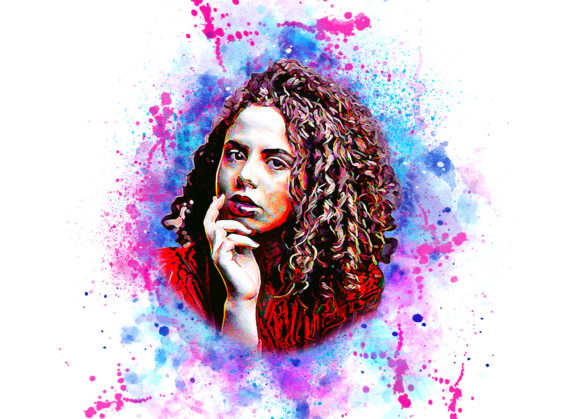
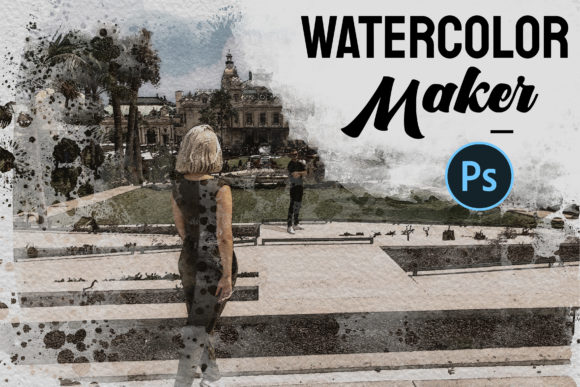
Once the brushing phase is complete, the user hides the brush layer and activates the action. The software then processes the image using a combination of custom brushes, patterns, and adjustment layers. The result is a textured, fluid appearance that closely resembles hand-painted watercolors. Because the process is built on actions and smart objects, the underlying pixels of the original photograph remain untouched, allowing for infinite adjustments without quality loss.
Key Features and Customization Options
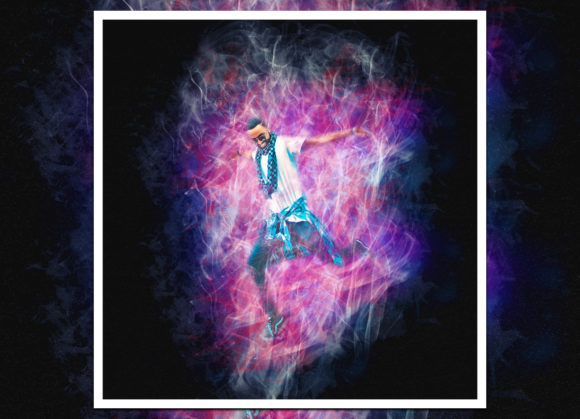
One of the most significant advantages of this tool is its flexibility. Upon execution, the action provides access to ten different color options via an unviewed eye layer structure. This variety allows creators to experiment with different moods and palettes without restarting the process. Whether aiming for soft pastels, vibrant primaries, or muted earth tones, the ability to switch presets quickly enhances the creative workflow.
- Non-Destructive Workflow: Every change is applied on separate layers, preserving the original image data.
- Customizable Brushes: Users can easily modify brush colors and characteristics to suit specific project requirements.
- High-Quality Output: Designed for professional use, the action supports high-resolution files, with recommended dimensions of 2000x3000 pixels for optimal detail retention.
- Comprehensive Package: The download includes the ATN file, custom brushes, patterns, a PDF read-me file, and a help guide to ensure smooth integration into existing workflows.
The inclusion of a detailed help file and read-me document is particularly valuable for users who may be new to using Photoshop actions. These resources clarify the specific naming conventions and layer management techniques required for the action to function correctly, reducing the learning curve significantly.
Software Compatibility and Technical Requirements
Compatibility is a critical factor when integrating third-party tools into a professional pipeline. The Smart Watercolor Photoshop Action demonstrates broad support across Adobe’s ecosystem. It is fully functional on Photoshop CS4, CS5, CS5.5, CS6, and all Creative Cloud versions from CC2014 through CC2020. The developer specifies that the English version of the software is required, which is a common constraint for actions that rely on specific menu commands or layer names that may differ in localized versions.
For professionals working with older hardware or software licenses, the support for CS4 and CS5 extends the tool’s usability beyond just the latest Creative Cloud subscribers. However, users should ensure their software is updated to at least the minimum supported version to avoid execution errors. The action has been tested primarily on the English interface, so users operating other language packs may need to adjust layer names or menu paths manually, which could complicate the automated process.
Practical Application and Real-World Performance
In practical terms, the Smart Watercolor Photoshop Action excels in scenarios where consistency and speed are paramount. For marketing agencies producing social media content, the ability to generate multiple variations of a product image with a cohesive artistic style can save hours of manual editing. Similarly, wedding photographers might use this tool to create unique album covers or artistic prints that stand out from standard digital edits.
The quality of the output depends heavily on the source image. High-resolution photos with good contrast and clear subjects yield the best results. Images that are too dark, noisy, or low-resolution may not translate well into the watercolor style, as the action relies on detecting edges and tonal variations to apply the brush strokes effectively. Therefore, adhering to the recommendation of using images around 2000x3000 pixels ensures that the texture and detail of the watercolor effect are rendered sharply.
Another strength lies in the selective nature of the effect. By requiring the user to paint on the “brush” layer, the action prevents the unwanted application of the effect to backgrounds or elements that should remain realistic. This level of control is often missing in one-click filter solutions, making this action a more versatile tool for composite work and detailed design projects.
Who Benefits Most from This Tool?
This action is particularly well-suited for freelancers, bloggers, and small business owners who need to produce high-quality visual content without dedicating extensive time to manual digital painting. Educators creating engaging presentation materials can also benefit from the ability to quickly transform standard stock photos into illustrative assets that capture attention.
Serious hobbyists and digital artists will appreciate the non-destructive nature of the workflow. It allows for experimentation without the fear of ruining the original file. Furthermore, the ability to tweak brush colors and select from ten different color options provides enough creative freedom to make each piece feel unique, rather than generic.
However, it is important to note that this tool is not a replacement for fundamental artistic skills. While it automates the technical application of the watercolor effect, the aesthetic success of the final image still depends on the user’s eye for composition, color theory, and selective masking. Those willing to invest time in learning the proper preparation steps will find the Smart Watercolor Photoshop Action to be a powerful addition to their toolkit.
Evaluating Long-Term Value and Usability
When considering the long-term value, the durability of the Smart Watercolor Photoshop Action lies in its adaptability. As design trends shift, the ability to customize colors and brushes means the tool does not become obsolete. The non-destructive workflow ensures that files created today can be revisited and modified years later, accommodating changes in client preferences or brand guidelines.
Usability is further enhanced by the clear documentation provided. The step-by-step instructions minimize trial and error, allowing users to achieve professional results from the first attempt. The requirement to rename the layer “brush” in lowercase is a minor hurdle that, once understood, becomes a routine part of the process. This small investment in learning the protocol pays off in the consistency and reliability of the output.
In conclusion, the Smart Watercolor Photoshop Action offers a robust, efficient, and flexible method for achieving high-quality watercolor effects. It bridges the gap between photographic realism and artistic interpretation, providing professionals and enthusiasts alike with a reliable tool for enhancing their visual storytelling. By combining ease of use with deep customization options, it stands out as a practical resource for anyone looking to elevate their digital imagery with a touch of classic artistic flair.